Meter readings
A reading is one complete conversation with the meter. ZiggyMeter opens the optical link, identifies the meter, collects every datapoint it is configured to ask for, closes the link and publishes the result.
Nothing is streamed continuously — the meter is polled, and what you see is always the result of the last readout.
What triggers a reading
| Trigger | Where |
|---|---|
| Schedule | Automatic, see below |
| Button | A single short click |
| Web interface | Meter → Readings → |
| REST API | GET /api/v1/iec62056/read |
| Zigbee | On/Off toggle on endpoint 2 |
Schedule
Configure it under Meter → Schedule. A schedule has three parts: a unit, a period and a trigger time telling the device where in the period to read.
| Unit | Available periods | Trigger fields used |
|---|---|---|
| Minutes | 1, 5, 10, 15, 30 | none — reads every n minutes |
| Hours | 1, 2, 4, 8, 12 | minute within the hour |
| Days | 1, 7, 14, 28 | hour and minute |
| Months | 1, 2, 3, 6 | day of month (1–28), hour and minute |
For example: unit hours, period 4, trigger minute 0 reads at 00:00, 04:00, 08:00 and so on. Unit months, period 1, day 1, time 06:00 reads once a month on the 1st at six in the morning.
INFO
Day-of-month is limited to 1–28 so a monthly schedule fires in every month, February included.
Choosing a frequency
The trade-off is resolution against power.
| Situation | Suggested starting point |
|---|---|
| Powered from USB-C or mains | 1 hour |
| Running on batteries over Zigbee | 24 hours |
| First setup or troubleshooting | 1 minute, then reduce once it works |
Each readout wakes the radio, so on batteries the reading frequency is the dominant factor in how long the cells last. See Power and batteries.
WARNING
A one-minute schedule on batteries will flatten a pair of AAA cells quickly. Use it to prove the optical link works, then set a realistic period.
What a reading contains
Each value is tagged with an OBIS code — the standard identifier used across European metering. A typical single-phase readout looks like this:
| OBIS | Meaning | Example |
|---|---|---|
1-0:1.8.0 | Positive active energy, total (import) | 4244.88 kWh |
1-0:2.8.0 | Negative active energy, total (export) | 4134.77 kWh |
1-0:1.7.0 | Instantaneous positive active power | 0.076 kW |
1-0:11.7.0 | Instantaneous current | 0.324 A |
1-0:12.7.0 | Instantaneous voltage | 234.98 V |
Which codes appear depends entirely on your meter and on how the utility configured it. Codes ending in .8.1 and .8.2 are tariff registers (day/night). Values may include a billing period marker such as *101.
The Meter → Readings page shows the raw value, the parsed number and unit, and a description in your interface language.
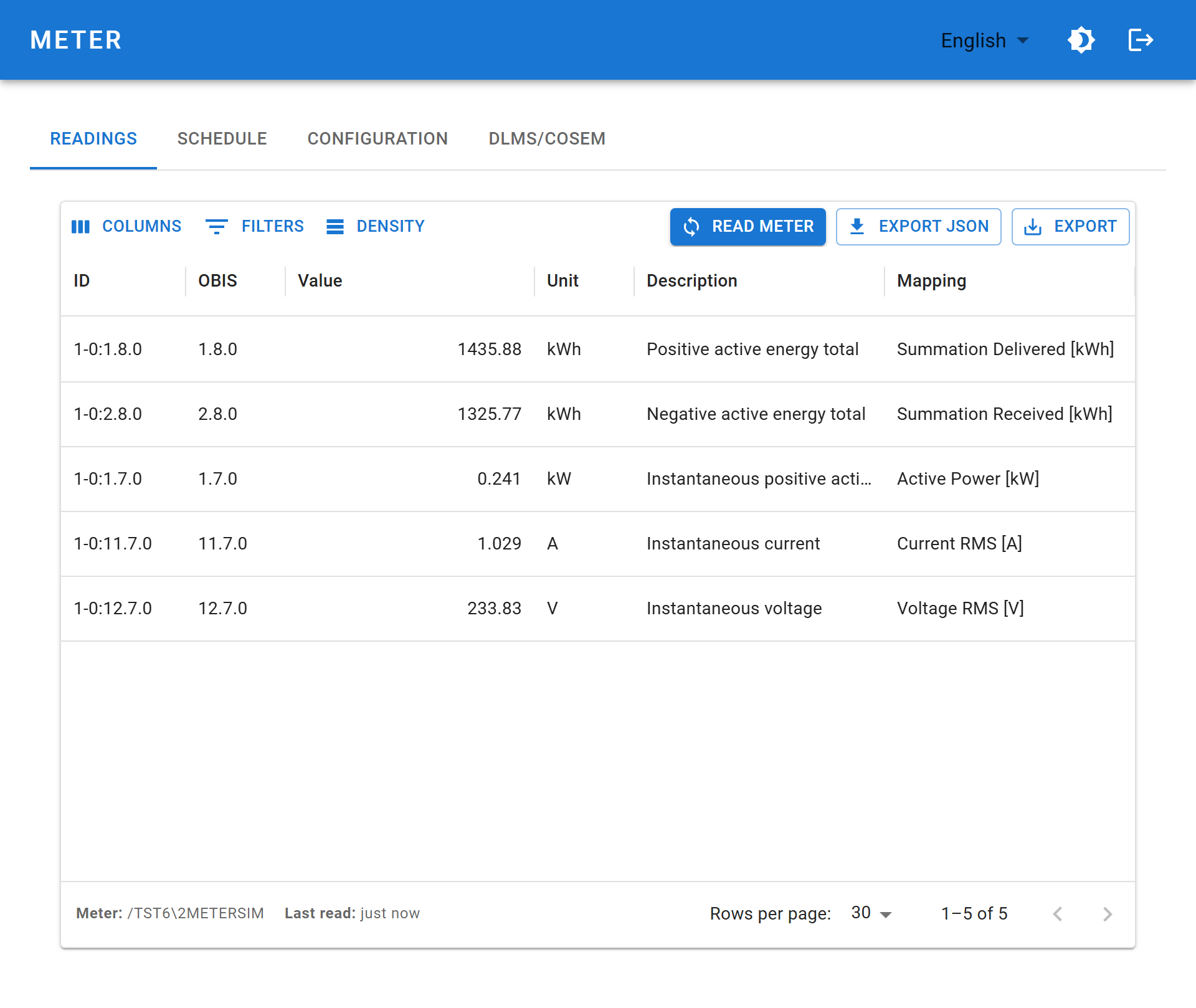
Where readings go
| Destination | Behaviour |
|---|---|
| Web interface | Last readout, held in device memory |
| REST API | /iec62056/last returns the same data without re-reading |
| Home Assistant | Pushed to the Home Assistant REST API after each readout |
| Zigbee | Mapped onto ZCL attributes and reported to the coordinator |
INFO
Readings are not logged on the device. ZiggyMeter keeps the last readout only. Long-term history belongs in whatever consumes the data — Home Assistant, InfluxDB, your own database.
Zigbee mapping
For Zigbee, each OBIS code is mapped to a ZCL cluster and attribute. The defaults cover the common codes:
| OBIS | Cluster / attribute | Meaning |
|---|---|---|
1-0:1.8.0 | 0x0702 / 0x0000 | Current summation delivered |
1-0:2.8.0 | 0x0702 / 0x0001 | Current summation received |
1-0:1.7.0 | 0x0B04 / 0x050B | Active power, phase A |
1-0:11.7.0 | 0x0B04 / 0x0508 | RMS current, phase A |
1-0:12.7.0 | 0x0B04 / 0x0505 | RMS voltage, phase A |
To change one, double-click the Mapping cell on that row in Meter → Readings and choose a different target from the drop-down. It saves immediately.
See Integrations → Zigbee for the available targets and the API alternative.
The clock
Every readout is timestamped. The clock is set from one of three sources — the Zigbee Time cluster, NTP over Wi-Fi, or manually from your browser — with Zigbee taking precedence when both radios are enabled. Set the timezone under System → Clock so local timestamps are right; see how the clock is set.
It is not battery-backed, so it is lost at power-on and after a power cut. Deep sleep does not lose it: a battery-powered device keeps correct time between readings.
Until the clock is valid, timestamps start from 1970 — a useful signal in the serial log that it has not yet been set.