Zigbee reference
This page documents what ZiggyMeter looks like on a Zigbee network: endpoints, clusters and attributes. For how to join a network, see Zigbee setup.
About Zigbee
Zigbee is a low-power wireless mesh protocol for IoT devices, running on IEEE 802.15.4 at 2.4 GHz. Messages hop through mains-powered routers, which is what makes it work in meter cabinets and basements where a direct Wi-Fi link would not.
ZiggyMeter joins as an End Device: it does not route for others, and it sleeps between readings.
Requirements
- A Zigbee coordinator — a USB adapter or hub that creates and manages the network
- Software that understands Zigbee Cluster Library v8 clusters
All clusters ZiggyMeter exposes are standard. There are no manufacturer-specific clusters, so most integrations work out of the box without a custom device handler.
Endpoints
Endpoint 1 — device
Device identification and basic status. Toggling the On/Off switch enables or disables Wi-Fi.
Input clusters
| Cluster ID | Name |
|---|---|
0x0000 | Basic |
0x0001 | Power Configuration |
0x0003 | Identify |
0x0006 | On/Off |
0x0402 | Temperature Measurement |
Output clusters
| Cluster ID | Name |
|---|---|
0x0003 | Identify |
0x0019 | OTA Upgrade |
Endpoint 2 — meter
Meter data. Toggling the On/Off switch triggers a meter reading.
Input clusters
| Cluster ID | Name |
|---|---|
0x0006 | On/Off |
0x0702 | Simple Metering |
0x0B04 | Electrical Measurement |
No output clusters.
Metering cluster (0x0702)
Two attributes, both standard. No proprietary commands are required.
| Attribute ID | Name |
|---|---|
0x0000 | Current Summation Delivered |
0x0001 | Current Summation Received |
Current Summation Received is only updated if the meter provides that value.
Electrical Measurement cluster (0x0B04)
Electrical parameters. The cluster declares the full attribute set below, but only three of them — Active power (0x050B), RMS current (0x0508) and RMS voltage (0x0505) — can be fed from a meter value and reported to a coordinator. See Available targets.
Which of those are actually updated then depends on the meter: a single-phase meter obviously never fills in phase B and C.
Some Zigbee integrations do not surface every attribute even when the device updates it correctly. Check the raw cluster values in your coordinator's own tools before concluding the device is not reporting.
| Attribute ID | Name |
|---|---|
0x0300 | AC frequency |
0x0304 | Total active power |
0x0305 | Total reactive power |
0x0306 | Total apparent power |
0x0501 | Line current (phase A) |
0x0502 | Active current (phase A) |
0x0503 | Reactive current (phase A) |
0x0505 | RMS voltage (phase A) |
0x0508 | RMS current (phase A) |
0x050B | Active power (phase A) |
0x050E | Reactive power (phase A) |
0x050F | Apparent power (phase A) |
0x0901 | Line current (phase B) |
0x0902 | Active current (phase B) |
0x0903 | Reactive current (phase B) |
0x0905 | RMS voltage (phase B) |
0x0908 | RMS current (phase B) |
0x090B | Active power (phase B) |
0x090E | Reactive power (phase B) |
0x090F | Apparent power (phase B) |
0x0A01 | Line current (phase C) |
0x0A02 | Active current (phase C) |
0x0A03 | Reactive current (phase C) |
0x0A05 | RMS voltage (phase C) |
0x0A08 | RMS current (phase C) |
0x0A0B | Active power (phase C) |
0x0A0E | Reactive power (phase C) |
0x0A0F | Apparent power (phase C) |
How meter values become attributes
The meter speaks OBIS codes; Zigbee speaks cluster attributes. ZiggyMeter holds a mapping table between the two.
Each mapping entry is an OBIS code plus a mapping ID: four bytes of hexadecimal, where the first two are the cluster and the last two are the attribute.
| OBIS | Mapping ID | Cluster / attribute | Meaning |
|---|---|---|---|
1-0:1.8.0 | 07020000 | 0x0702 / 0x0000 | Current summation delivered |
1-0:2.8.0 | 07020001 | 0x0702 / 0x0001 | Current summation received |
1-0:1.7.0 | 0b04050b | 0x0B04 / 0x050B | Active power, phase A |
1-0:11.7.0 | 0b040508 | 0x0B04 / 0x0508 | RMS current, phase A |
1-0:12.7.0 | 0b040505 | 0x0B04 / 0x0505 | RMS voltage, phase A |
Change it when your meter uses a code the defaults do not cover — for example a meter that reports its voltage under a model-specific code, so the value shows up in a readout but never reaches your coordinator.
Changing a mapping
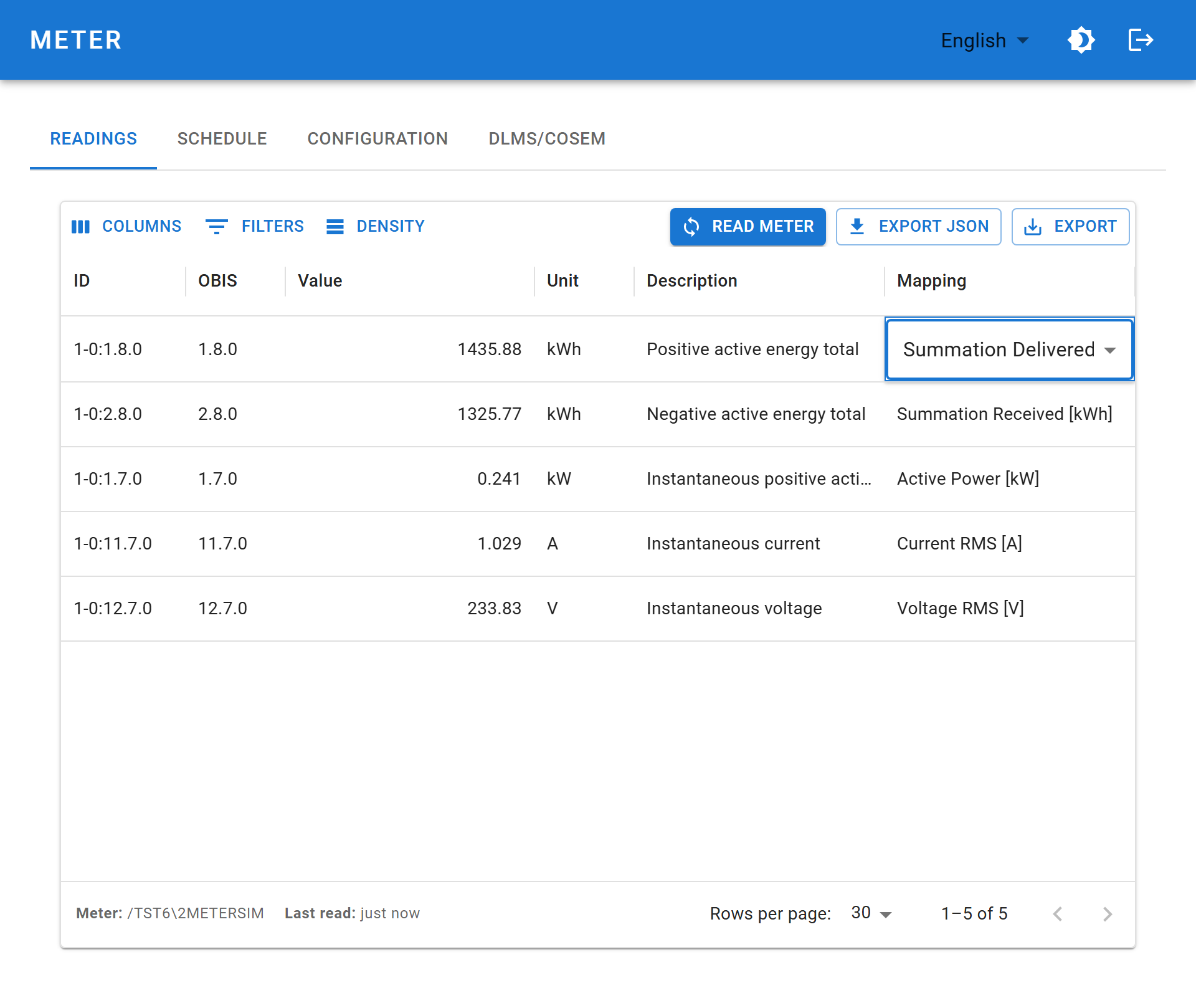
Do this in the web interface. Open Meter → Readings and double-click the Mapping cell on the row you want to change; the cell turns into a drop-down of the available Zigbee targets. Pick one and it is saved immediately — there is no separate save step.
INFO
Only OBIS codes that appear in a readout can be mapped, because the table is the readout. If the row you want is not there, read the meter first.
Available targets
The drop-down offers six choices, and no more. Only these five cluster/attribute pairs may be assigned an OBIS code — the rest of the attributes listed above exist on the clusters but are not mapping targets.
| Drop-down entry | Mapping ID | Cluster / attribute |
|---|---|---|
| Unassigned | 00000000 | — (the value is read but not published over Zigbee) |
| Summation Delivered [kWh] | 07020000 | 0x0702 / 0x0000 |
| Summation Received [kWh] | 07020001 | 0x0702 / 0x0001 |
| Active Power [kW] | 0b04050b | 0x0B04 / 0x050B |
| Current RMS [A] | 0b040508 | 0x0B04 / 0x0508 |
| Voltage RMS [V] | 0b040505 | 0x0B04 / 0x0505 |
WARNING
Each target can be used by one OBIS code at a time. Assigning a target that another row already holds moves it: the other row is automatically set back to Unassigned. Check the table after a change if you are re-arranging several rows.
Matching is on the full OBIS code including tariff (1-0:15.8.0*101). The API also accepts matching on the short code (15.8.0).
Editing through the API
/api/v1/zigbee/map reads and writes the same table, which is useful for provisioning several devices identically. It is an alternative to the web interface, not the normal route — a POST replaces the whole table and does not apply the one-target-one-code rule for you.
Firmware over the air
Endpoint 1 carries the standard OTA Upgrade cluster (0x0019), so any coordinator that supports Zigbee OTA can update the device. Ready-made index files are published for Zigbee2MQTT and for zigpy/ZHA: