How ZiggyMeter works
ZiggyMeter is a small battery- or USB-powered device that clips magnetically onto the optical port of a utility meter, reads the values the meter reports, and publishes them to your smart home over Wi-Fi or Zigbee.
It is not a meter and it does not measure anything itself. Everything it reports comes from the meter, which is why the figures match your bill.
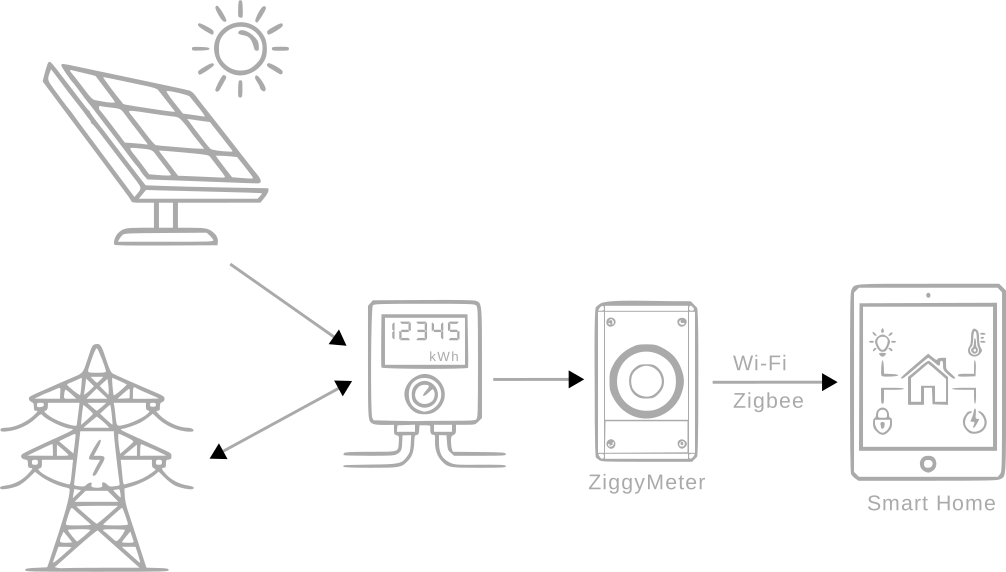
The three stages
1. Read the meter
Most electricity meters carry a round infrared window on the front — the IEC 62056-21 optical interface. ZiggyMeter snaps onto the metal ring around it and communicates with the meter through that window using one of two protocols:
| Protocol | Typical use |
|---|---|
| IEC 62056-21:2002 (modes A–E) | Older and simpler meters. Sends readings as ASCII text. |
| DLMS/COSEM | Modern meters. Structured objects, optionally password-protected and encrypted. |
Which one your meter speaks — and how much data it hands over — depends on the model and on your utility. See Meter protocols and Before you buy.
A reading is triggered on a schedule, by a single click of the button, or from the web interface or API.
2. Store and translate
Every value the meter returns is tagged with an OBIS code — a standard identifier such as 1-0:1.8.0 for "positive active energy, total". ZiggyMeter keeps the last complete readout in memory, along with the numeric value, the unit and a human-readable description.
For Zigbee, each OBIS code is mapped onto a standard Zigbee Cluster Library attribute, so coordinators understand the data without a custom device handler. See Zigbee integration.
3. Publish
| Channel | What it gives you | Power cost |
|---|---|---|
| Wi-Fi + web interface | Browser access to live readings and all settings | Highest |
| Wi-Fi + REST API | Machine-readable JSON for your own software | Highest |
| Wi-Fi + Home Assistant | Sensors pushed straight into Home Assistant | Highest |
| Zigbee | Standard metering clusters into any Zigbee coordinator | Lowest |
| USB serial | A plain-text log of what the device is doing | Free (already cabled) |
On batteries, Zigbee is the practical choice; see Power and batteries.
Nothing leaves your home
There is no cloud service, no account and no subscription. The device never needs an internet connection to do its job — only your browser does, and only when you ask it to check for a firmware update.
That also means the device cannot be switched off remotely or bricked by a discontinued service. See Security.
What the device looks like
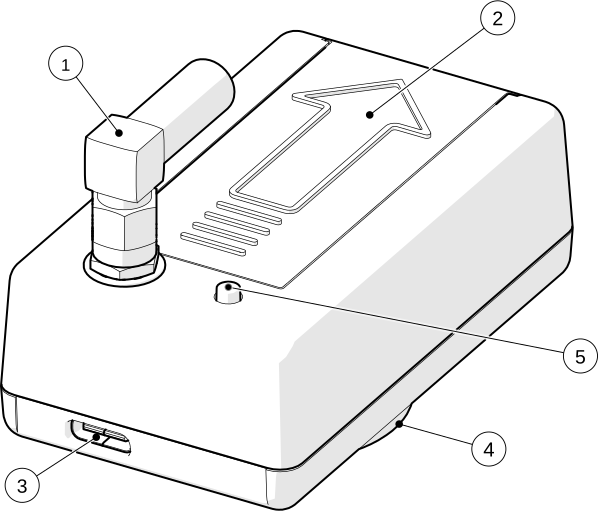
- 1 Antenna (SMA, detachable)
- 2 Battery compartment (2 × AAA)
- 3 USB-C — power and serial console
- 4 Optical interface with magnet
- 5 Button
Three LEDs report status: red for Wi-Fi, blue for Zigbee, green for the meter. The full pattern table is on Button and LEDs.