
Zigbee2MQTT
Zigbee2MQTT is an open‑source Zigbee bridge. As the name suggests, it converts Zigbee data into MQTT messages, enabling ZiggyMeter to integrate with systems that rely on MQTT. When using Zigbee, you can receive device messages and measurements via MQTT.
MQTT is a lightweight publish‑subscribe messaging protocol. It is commonly used in IoT for efficient communication between devices (sensors/actuators) and automation systems (for example Home Assistant or Node‑RED).
Requirements
- A Zigbee coordinator supported by Zigbee2MQTT
- Zigbee2MQTT running and connected to an MQTT broker
- ZiggyMeter powered on with Zigbee enabled
Pair ZiggyMeter
- Open the Zigbee2MQTT frontend and enable Permit join (left bottom on the menu).

- Put ZiggyMeter into Zigbee joining mode:
- Recommended: press the ZiggyMeter button for 4 seconds (Zigbee reset).
- Alternative: in the ZiggyMeter web interface go to the Zigbee page and press ZIGBEE RESET.
- Wait until ZiggyMeter appears in the Zigbee2MQTT Devices list.
- (Optional) Set a friendly name in Zigbee2MQTT. This name becomes part of the MQTT topic.

WARNING
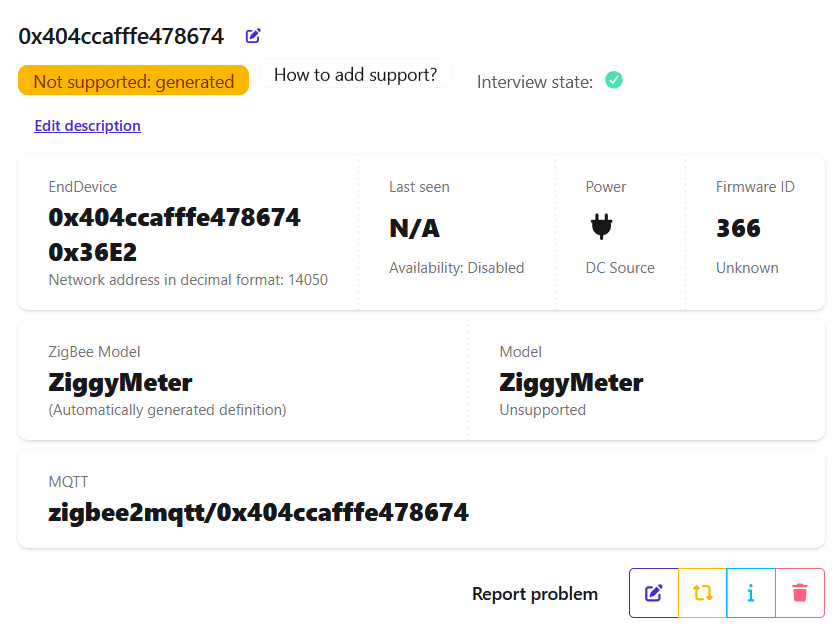
You may see a "Not supported" message. This just means ZiggyMeter is not in the Zigbee2MQTT device database. You can safely ignore it.
Device details
If you click device link you'll see details of the device including MQTT topic.
Receive data via MQTT
Zigbee2MQTT publishes ZiggyMeter measurements as MQTT messages so your automation system can consume them.
- Default topic pattern:
zigbee2mqtt/<friendly_name> - The base topic (
zigbee2mqtt) can be changed in Zigbee2MQTT settings.
To see what ZiggyMeter is publishing, subscribe to the device topic with any MQTT client.
Example (Mosquitto):
mosquitto_sub -t 'zigbee2mqtt/<friendly_name>' -vResult:
zigbee2mqtt/0x404ccafffe478674 {"current_2":null,"energy_2":129496,"linkquality":204,"power_2":null,"produced_energy_2":67296,"state_1":"OFF","state_2":"OFF","temperature":36.59,"voltage_2":null}A null field means the meter did not provide that value.
Viewing data
In the Zigbee2MQTT frontend, open the ZiggyMeter device page.
The following subtabs are useful:
- Exposes — view measurements such as power and device temperature
- Clusters — browse the Zigbee clusters exposed by the device
- Dev console — read and write attributes in endpoint clusters
Upgrades
You can configure Zigbee2MQTT to upgrade ZiggyMeter firmware automatically. See the Zigbee2MQTT guide: Zigbee2MQTT OTA updates.
ZiggyMeter provides OTA firmware files and an index file compatible with Zigbee2MQTT. During setup, use this remote OTA index URL: https://fw.ziggymeter.com/z2m_index.json
Troubleshooting
- Device does not join: enable Permit join in Zigbee2MQTT, run Zigbee reset (button for 4s), and place ZiggyMeter close to the coordinator.
- No MQTT messages: confirm Zigbee2MQTT is connected to the broker, and subscribe to the correct base topic and friendly name.